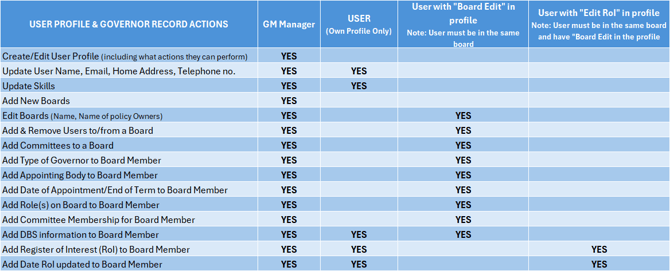
In the majority of cases it is the GM Manager that will set up boards, add users to them and then create the Governor Records. The user can add and date their own 'Register of Interests' and DBS information.
It is also possible to give certain users (e.g. the Clerk) additional level of access such that they can update a board and parts of the Governor record for Governors on the board where they serve. They can also be given permission to update the Register of Interests on behalf of the user (an extra option in their profile).
To give a user this additional access, the GM Manager must add 'Edit Board Members' to their user profile. Allowing a user to edit Governor Records - Instructions.
Details of 'Who can do what' are shown below (including what user profile information users can update).
If you require any more information please contact the Governance Manager Support Desk on 0333 050 9167.