Your organisation may have already created events or CPD activities for you to attend or partake in, these can be used as evidence and compliment your own or schools objectives.
Locating Training event/activities:
-
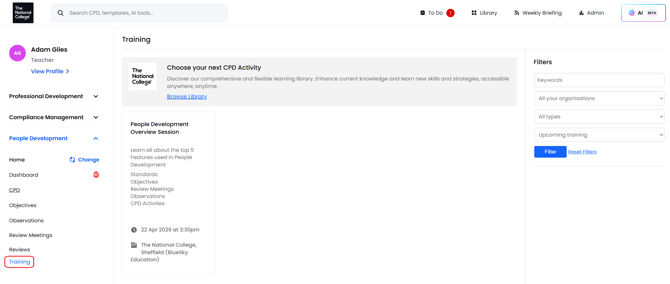
Select the Training feature on the left hand navigation to view these activities.
- Here you will see the details of the event, including when and where it will take place, facilitator details and any documentation you will require.
Booking the Training event/activity:
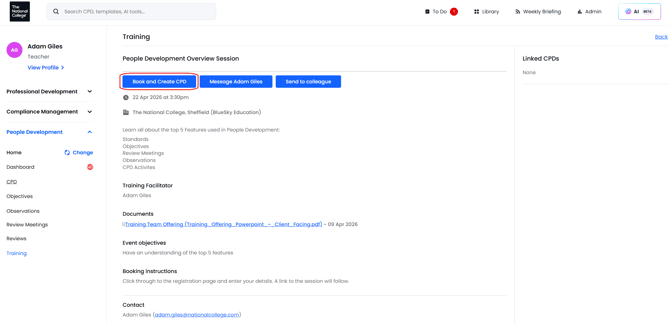
- Select the Event/Activity you wish to attend.
- Click the 'Book & Create CPD' button along the top or send to a colleague.
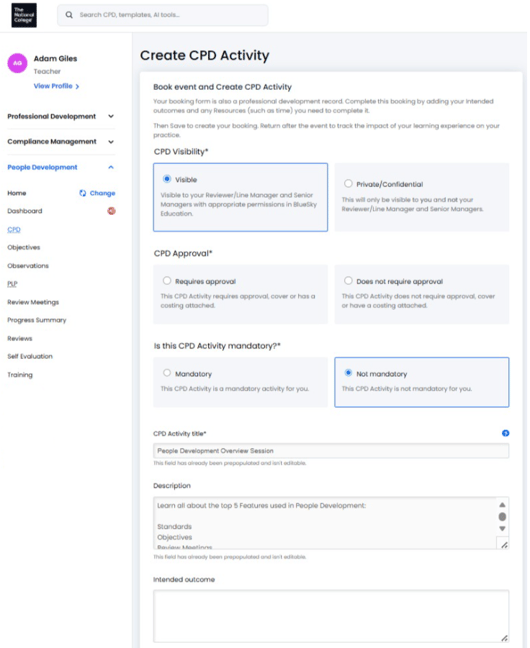
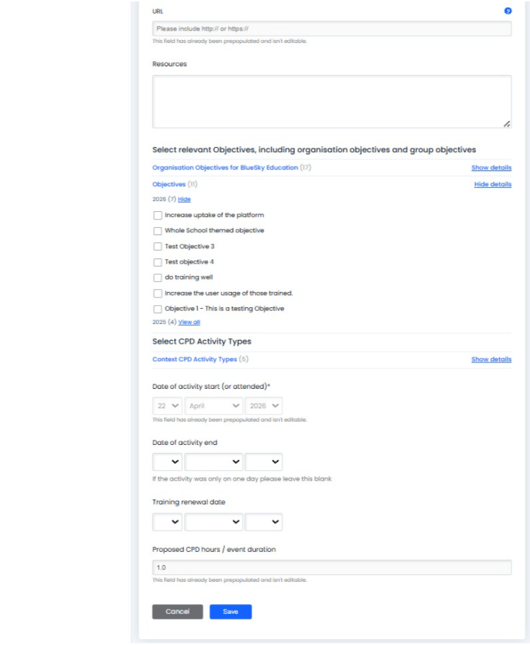
The following form lifts the information from the event and allows you to apply the info to your CPD progress as well as being able to credit against any objectives you may have.
- Make selections based on; if the training is mandatory, if it requires approval. If this training event will benefit or evidence towards your own or schools objectives and enter in dates of start and completion.
- Click "Save" at the bottom, once complete.
This training event will now show in your CPD features area on the left. Navigate to update or complete. See HERE for a guide on completing CPD activities.
Additional Notes:
- If you selected "Requires approval" this will go to your manager or CPD Team to approve.
- Cover and Payment can also appear as options within the Training Event form and will therefore need to be selected and approved by Manager or CPD Teams.
See also:
Individuals: Setting self-led objectives