In a large MAT it is sensible to 'delegate' certain aspects of the Governor Records to the local Chair or Clerk. Governance Manager allows this to happen but having an additional 'permission' in a user profile for a non-Manager. To give this access the user must have 'Edit Board Members' added to their user profile - this will allow them to make changes to any board that they are a member of.
For a full list of 'who can do what' see the section on Board & Governor Record update.
This additional permission allows the user to perform the following tasks in any board where they themselves are a member.
1. Add Committees to that board (using the Board > Edit Board function (no other editing options are available - these are reserved for the GVO Manager)
2. Add/Remove board members (they must already be in the GVO).
3. Update Governor records for other board members with their roles on that board (from the pre-defined lists), and the committees they sit on.
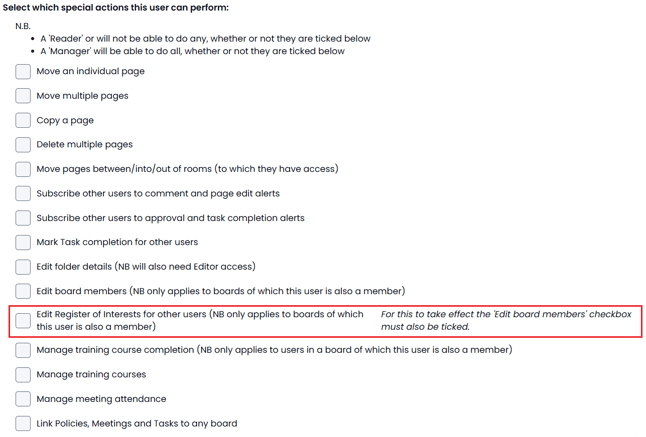
4. (Optional via profile checkbox) - to update the Register of Interest for a user on the board
The Local GVO Manager can add this additional permission to a user by using the 'Users' option from the main navigator, then select the user then use 'Edit Profile'. The setting is at the bottom of the 'Special Actions' list...
Note: There is a second 'checkbox' that also allows this delegated authority to update the Register of Interests for a user
(NOTE: they must also have the first 'Edit Board Member' checkbox selected for this to work).
Press SUBMIT to save the changes.