Amendable User Groups can be created by School Group Managers. When created, School Managers can then add or remove users from their school to a user group created at Group level.
- School Group Managers maintain full control over the User Groups name and structure.
- Schools can only see the users within their own school.
- Changes made by one school do not affect other schools.
Amending a User Group as a School Manager
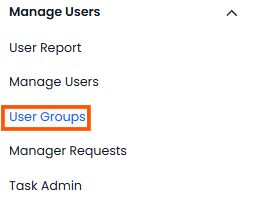
- To amend the User Group as a School Manager click on ‘User Groups’ under the ‘Manage Users’ heading in the left hand navigation.
- Locate the User Group. If it is amendable you will see 3 dots at the end of the row. If the User Group is not amendable, School Managers will not see these 3 dots.

- Click on the 3 dots and select ‘Edit’
- School Managers are able to edit the users within the group but cannot rename or delete the Group.
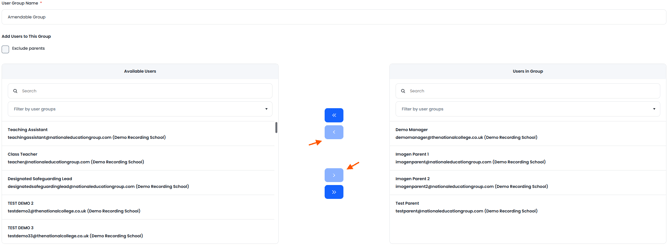
- To add users select them from the left hand column and click on the right hand facing arrow.
- To remove users, select them from the right hand column and click on the left hand facing arrow
- Click on ‘Save’
- School Managers can only edit and see users from their own schools. Changes made by one school do not affects any other school.
If a User Group is not amendable, the option to edit will not be available to School Managers and only School Group Managers can make edits.