- Once logged in to The National College, click on 'My Learning Plans' from the left hand navigation.
- Learning Plans assigned to you, as well as your personal Learning Plan where you can find content that you have assigned yourself will be shown under the 'My Learning Plans' heading.
- Click into a Learning Plan and select the content you wish to view.
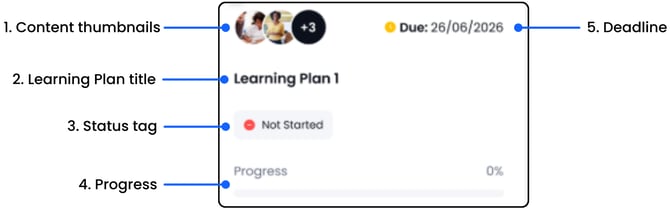
1. Content thumbnails:
This tells you how many pieces of content are in the Learning Plan. Up to two image thumbnails will be displayed. If there are more than two pieces of content in the Learning Plan, a number will be displayed in the third thumbnail. In this example there are 5 pieces of content in the Learning Plan.
2. The Learning Plan title:
You can search by title using the search bar
3. Status tag:
There are 5 status tags for Learning Plans: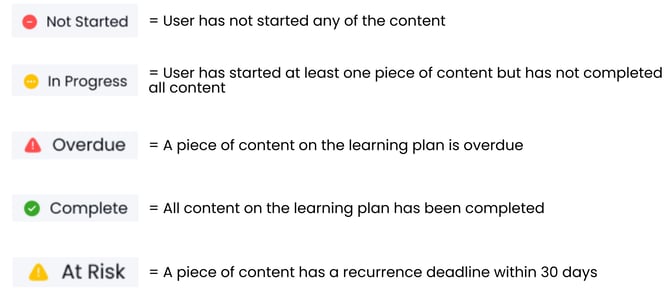
4. Progress:
The progress bar shows % completion across all content in the Learning Plan
6. Deadline:
This shows the deadline for the Learning Plan. If there are courses with recurrence set, the date by which you will need to retake the course will be displayed on the card within the Learning Plan. The content will also be automatically added to your Task List 30 days before the recurrence deadline.