Adding a new Governor (user) to Governance Manager or adding users to a new GM
When a new Governor (or other user) is appointed or when a new Governance Management instance is being set up, you can add them immediately or it can be very handy to create the user profiles using an 'inactive' mode. This will save time later.
Details about how to create a user profile (GM user account) for a new Governor/Trustee can be found HERE.
To do this use the 'Inactive' user profile option when creating a new user (rather than Reader, Author, Editor or Manager). This sets up the user profile in Governance Manager and allows the new user to be added to groups, and boards, governor records to be created but the user cannot sign into GM and is totally unaware (no welcome email is generated).
When the time is right to give access to the user(s) the user profile can be switched to Reader, Author, Editor or Manager (as appropriate) and a Welcome email (to set a password) can be generated (edit the profile, select 'Send Welcome email' and submit).
For more information about user profiles see the help section on Add and Edit User Profiles.
The section of the user profile create/edit to do this looks as shown below:
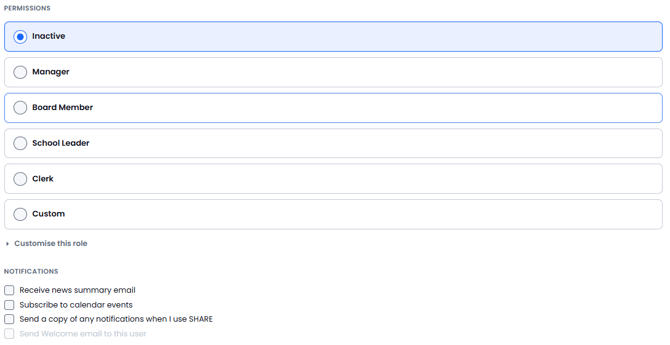
❗Don't forget to select 'Send Welcome email to this user' when you make them 'live' for the first time
Permissions
This table breaks down what permissions the users can have
|
Role |
Base access level |
What it is |
|---|---|---|
|
Inactive |
Inactive |
No access, cannot sign in. Board membership and records can still be created against them |
|
Manager |
Manager |
Full control of the setting — every content type and every special action |
|
Board Member |
Author |
Governor or trustee. Contributes content and takes part in meetings; no administrative actions over other users |
|
School Leader |
Editor |
Head or Deputy. Edits existing content, moves and copies pages, manages tasks and alerts for their team |
|
Clerk |
Editor |
Drafts agendas and minutes, manages meetings, board membership and Register of Interests |
|
Custom |
Reader (starting point only) |
Build from scratch — auto-opens the advanced panel |
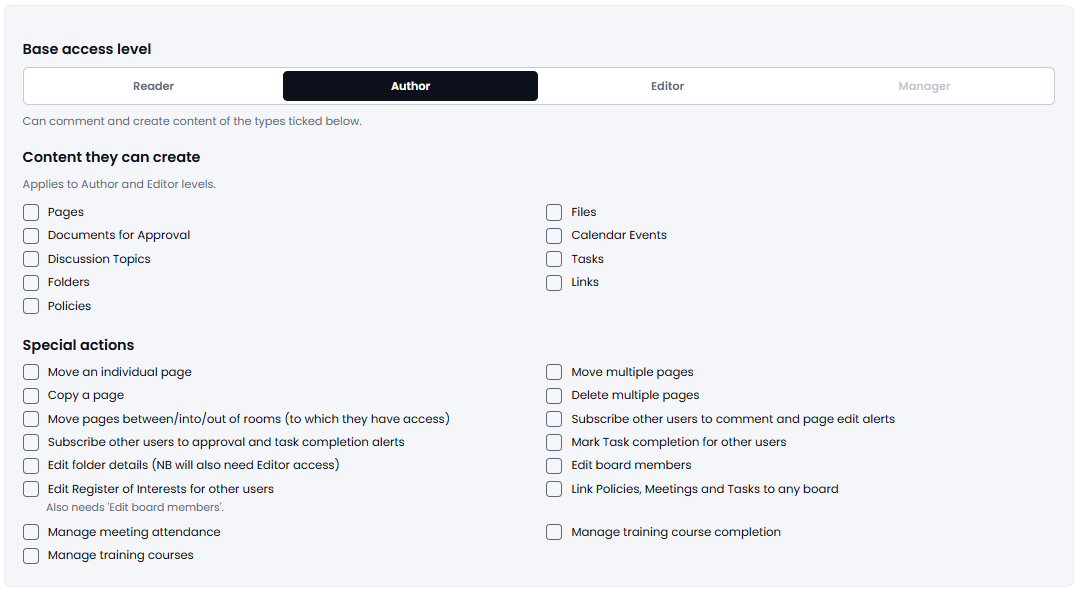
Custom
Selecting custom gives you a range of options that you can select for a specific permissions setup
Other tasks to carry out for a new user:
1. Add them to the 'board' (if appropriate).
2. Update their 'Governor Record' with terms of office etc.
3. Get them to sign in and update their Register of Interests and also update the Skills Audit.