It is possible to mark a task as completed (or mark as incomplete) on behalf of another person - this can be very useful for task owners and clerks.
Note: This feature is not available if completions have been locked for this task
This facility is available if:
- You are the task owner (the person who created the task)
- ...or you have the ability to mark completion for others in your user profile
- ...or you are the GM Manager
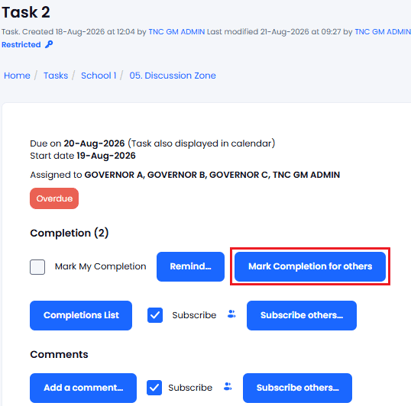
If you have the ability to mark task completion for others then a button will be available in the Task View. The button will not be visible if you do not have permission to do this:
You will then see the full list of people who have been assigned to the task with their completion status - either ticked (completed) or not ticked (not completed):
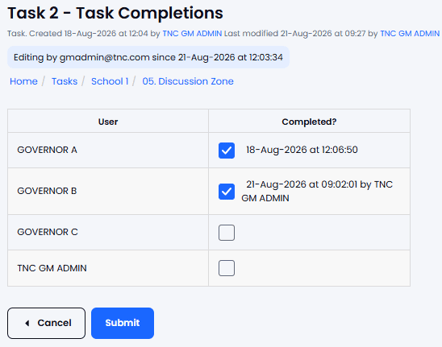
Tick the users that have completed and untick any that have not completed and press Submit to save.
Completion Alerts: Any user subscribed to receive automatic 'Completion Alerts' will receive a notification simply stating that user <name> has amended the completion information (the person making the changes does not get that alert).
The Completions List will show if a Task Completion has been made by another user:
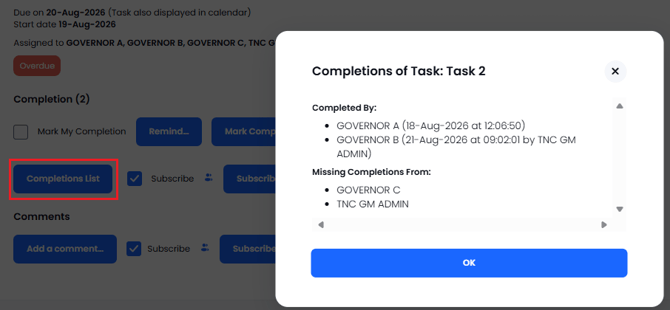
Note: This feature is not available if the Task is 'fully complete' or completions are locked.
Link to TASKS OVERVIEW