Task owners and people assigned to tasks will want to see the progress of the task and who has completed their action.
There are several ways to do this:
- Navigate to the Task either vie the Tasks area (main menu) or via the folder structure (to the folder where the task are being stored). You can also use the Governance Manager search feature if you know the title of the task.
Once you find the task look for the 'Completions List' button and that will show who has and who has not marked the task as completed: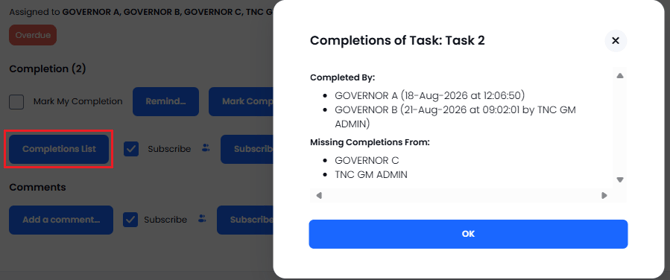
2. In the Task Area (either Tasks Assigned to Me or Tasks I have assigned to Others) look for the task and in the summary list you can see the number of completions marked against each task and next to that number is a small black "i" icon - press that to see the list of completions:
3. The Task Reporting area is another way to find this information - see TASK REPORTING
For more help please contact the Governance Manager Support Desk on 0333 050 9167 or gmsupport@nationalcollege.com.
Link to TASKS OVERVIEW