The Learning Plan Report allows you to see completion progress across each Learning Plan.
- Navigate to the Learning plan by clicking into 'Admin' before selecting 'Professional Development' and then Learning Plan Dashboard' from the left hand navigation
- Find the Learning Plan you wish to report on
- Click on the 3 dots on the Learning Plan Dashboard card to access the actions
- Select 'View Report'
- At the top of the report there are 3 dials:
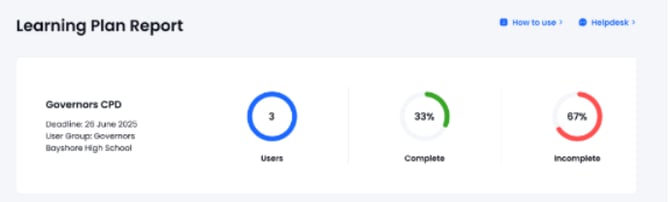
Users = The number of users assigned to the Learning Plan
Complete = The % of users who have completed all content in the Learning Plan
Incomplete = The % of users who have not completed all content in the Learning Plan
You can view the report in 2 ways. Use the switch to toggle between views
1. User view:
Gives a simplified overview of all users progress across all content in the Learning Plan
2. Compliance view:
Gives detailed information on user progress and completion dates across selected content
-
You can use the ‘Export Progress’ button to download this information in a spreadsheet format.
-
You can download Impact reviews by ‘Export Impact Reviews.’
If you receive an error message when clicking this option it may be that users have either not completed the content, or that review period is not yet complete eg the review period is 12 months and you try to export the reviews before this time has elapsed.