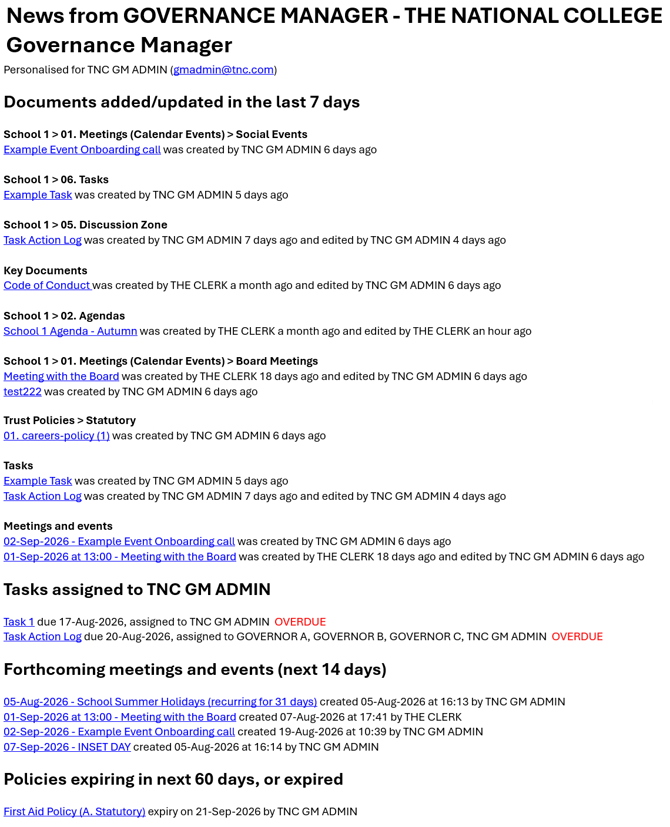
Everyone uses the calendar to record the dates of the governors’ meetings. But it can do much more than that. Governance Manager automatically sends out a personalised weekly Newsletter (normally on Sunday morning but the day can be changed by your local GM Manager - see Master Settings) to all users advising them of all the new documents that have been put into Governance Manager and any that have been modified.
The Newsletter also includes information about events in the calendar in the forthcoming week. Tasks that are due and Policies needing review are also displayed in the newsletter (if relevant).
So, if you include a record in the calendar of all the events that are happening at the school/college, such as term start and finish dates, school plays, outings, sports day, parents evenings etc, etc, governors will be informed automatically on a weekly basis about what is going on at the school/college. This can be helpful in strengthening the link between school/college and governors.
The weekly Newsletter is personalised for each user so that each Governor only sees links to new or updated information relevant to them. If a Governor has no access to a particular item then it will not appear in the newsletter.
Below is an example of the newsletter personalised for the user TNC GM ADMIN:
NOTE: Each user has the ability to switch off the weekly newsletter by editing their user profile (but we strongly recommend that you do not do this or you will miss all the updates).
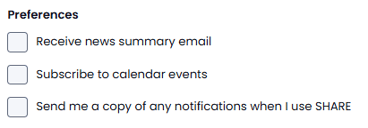
To do this the user may select their Initials (top right), select 'Profile' then 'Edit' and use the checkboxes to select preferences:
NOTE: The GM manager can switch off the newsletter for all GM users if required. Use the Settings option (only available to the GM Manager).
NOTE: The newsletter by default is sent out on a Sunday morning at 8.00am but the day can be changed by the GM Manager (see help on System Admin settings for Managers).