What is Two Factor Authentication (2FA)?
Two Factor Authentication (2FA) adds an extra step to login security. If 2FA is enforced, after entering their email and password, users must verify with a 6-digit code sent to their registered email.
Enabling or disabling 2FA is carried out by School Managers:
- Click into Admin
- Select 'Account' and then 'Organisation Settings' from the left hand navigation
- Ticking or unticking the 'Enforce 2FA' box will enable or disable 2FA accordingly
- This change will apply to all users in your school immediately.
When 2FA is enabled:
- Users must enter a verification code at every login (after session expiry)
- The user enters their email and password
- They will receive a message on screen:
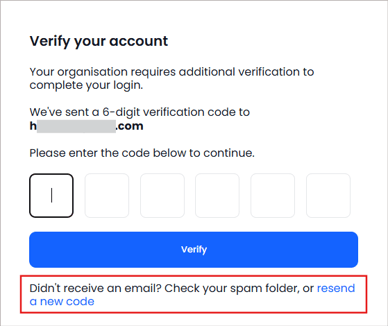
- A 6-digit verification code will be sent to the email address shown on the screen
- The code will expire after 10 minutes. Users can generate a new code by clicking the 'Resend a new code' link. The previous code then becomes invalid.
ℹ️ 2FA cannot be used with Single Sign-On. Since SSO has its own security via Google and Microsoft, users logging in with SSO will not be asked for a 2FA code from us.