What is SSO?
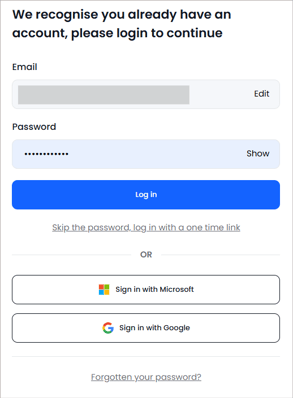
Single Sign-On is where a user logs into the platform using their school Microsoft or Google credentials. To help schools and trusts manage secure access to the platform, administrators can choose whether or not to enforce SSO.
ℹ️ The option to sign in with SSO is always available, even if the option to enforce SSO is unticked. Enforcing this option simply means the user has to use SSO to sign in.
Enforcing SSO can be enabled and disabled by School Managers:
- Click into 'Admin'.
- Select 'Account' and then 'Organisation Settings' from the left hand navigation.
- Toggling the Single Sign On switch will enable or disable enforcement accordingly.
- This change will apply to all users in your school immediately.
When SSO is enforced:
- Users can only log in with Microsoft or Google.
- The option to input an email and password is disabled and will not be visible on the screen.
- Since a password cannot be used when SSO is activated, the 'Forgotten Password' link is removed from the login screen.
- Once authenticated via Microsoft or Google, the user is logged in automatically.

When SSO is not enforced:
- Users have the option to log in with either an email or password if set, or to use single sign on.
- When logging in, if a user doesn’t yet have a password set up they will be prompted to complete a password reset to do this.
- The 'Forgotten your password' and 'One time link' options are still visible