When areas of GM are ‘access controlled’ it is important to know who can, and who cannot, see the folder and documents in the folder.
If someone can see a folder or document when they should not see it then the access permissions to that folder or paper are not correct. The same applies if a person should be able to see a folder or document but cannot see it.
In GM if a user does not have access to a folder or a particular document then they do not see it (it is not greyed out, it is not visible).
Here are a few ‘handy hints’ to identify the access restrictions in place for folders and for documents.
FOLDERS
- If a folder has access controls in place then when looking at the folder you will see there is a ‘key’ next to the folder icon.

If you click on the key icon you will see what access restrictions are in place…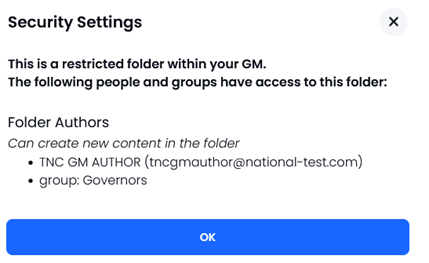
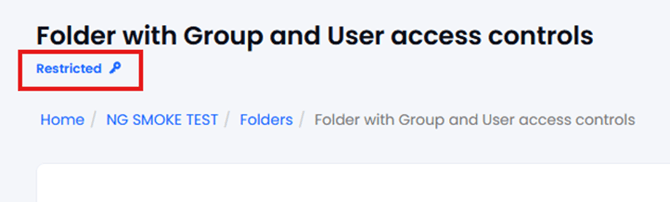
- If you open the folder (to see the contents) you will see the same information…clicking on the word ‘Restricted’ shows who has access (groups and named users).
- You can use the ‘SHARE’ function to share from a folder or a document … this will list all the names of the people who can access it (and any groups).

- NOTE: When a folder has access control applied ALL sub-folders of that ‘parent’ folder have the same access controls in place (they cannot be different)
DOCUMENTS
Documents inside folders have the same access restrictions as the folder but can also have additional restrictions applied (must be a subset of the people who can see the folder).
If Users A, B, C, D can access the folder then any documents inside that folder with no document level access restrictions will be visible. Documents can have additian access controls applied so, for example, a document in a folder could just be visible to Users A & B (so users C & D will not see it).
When a document has access restriction applied at the ‘Document’ level then there is a key next to that document in the folder view…
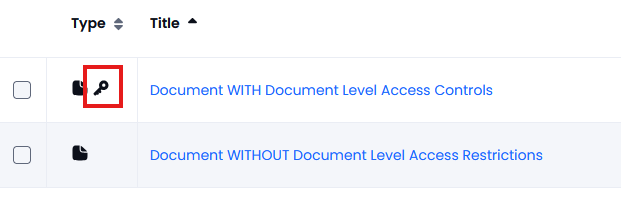
Clicking on the key next to the document shows who has access…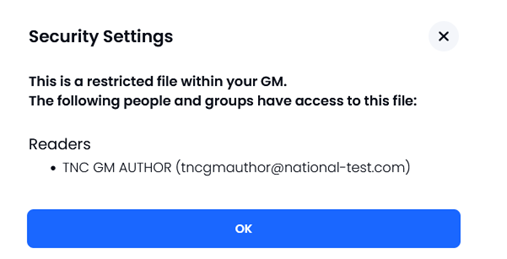
As with folders, if you use SHARE from a document you will see only the list of users who can access that document.
If any names are present that should not be or names missing that should be there then this is down to incorrect access controls. To solve this then the Folder (or Document) owner needs to edit and adjust the permissions.