- Click on 'Admin' in the top navigation.
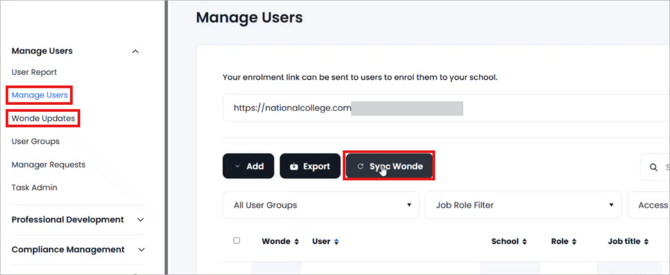
- Click on 'Manage Users' in the left hand navigation.
- Click on the 'Sync Wonde' button towards the top of your screen.
- Click on 'Wonde updates' in the left hand navigation.
- The data you see will mirror that in your MIS
Accepting or declining new users:
-
To accept or decline a single user click on the 3 dots at the end of the user row.
- Click to accept or decline.

- To accept or decline in bulk, tick the top box to select all users.
- Untick anyone user you do not wish to apply the action to.
- Click on the Accept or Decline users button as appropriate.
