When you access a ‘page’ (file, event, discussion etc) in Governance Manager it is initially in ‘view’ mode (assuming you have permission to see that document).
If you have the correct permissions you can also ‘Edit’ the item (usually accessed via the Actions button).
When you are in edit mode the page is ‘Locked for Editing’ to prevent anybody else editing at the same time.
If you leave the page without pressing CANCEL or SUBMIT then the page is left ‘locked’ to prevent other users from making edits.
If another user who can normally edit the document visits the page when it is locked then actions button will be missing and a blue banner shows that the page is being edited (it says who is editing and when).
Note: The button to CANCEL the ‘edit lock’ is only visible to the document owner (the person who created it) and the GM Manager.
Example below…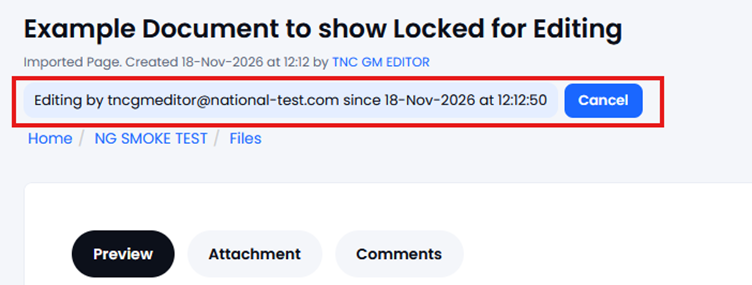
If you are the GM Manager or the document owner you can cancel the ‘locked page’ using the Cancel button otherwise you will need to contact the person who has that page locked and ask them to unlock it – they do this by going to that page and pressing the cancel button – that will cancel the lock
A GM Manager can see what pages are locked by visiting the Wastebin and selecting the ‘Pages being Edited’ tab…
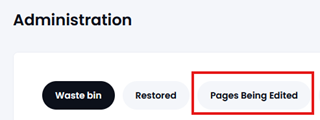
A list of ‘locked pages’ is displayed as well as when it was locked and by who…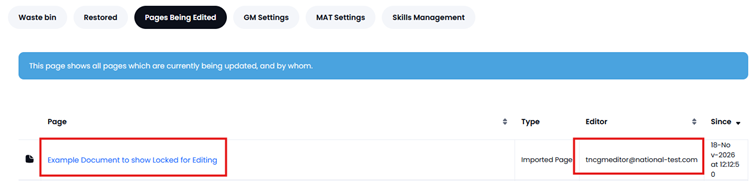
The GM Manager can click on each one and cancel the lock as appropriate.
Note: Locked pages are cleared overnight