For Notifications
-
After logging in navigate to 'People Development' on the left hand side
- You will be in the dashboard, click the 'Notifications' area on the dashboard.
- For Single removals click the envelope button at the end of the row

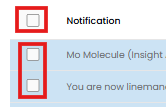
- For Bulk removals you can either click the square at the top on the left hand side or individual squares for selected notifications, then a button will appear at the top for you to either Mark as read or Delete for the selected notifications.

- For Single removals click the envelope button at the end of the row
For Updates
- After logging in navigate to 'People Development' on the left hand side
- You will be in the dashboard, click the 'Updates' area on the dashboard.
- To remove a notification on this page, press the envelope button on the notification its self in the top right and this will mark it as read.
