When 'comments' are added to a page (a file, an event, a policy, a discussion, a task or a page) then there are several ways that you can find out about the update. You can choose the one that is most suitable for each situation - Subscribe is the easiest.
1. Wait for the weekly newsletter.
2. Sign into Governance Manager to check on the 'Most Recent Content' page.
3. Receive a 'GM Notification' from the person who has added the comment (which relies on them sending it)
4. Use the SUBSCRIBE function to receive automatic updates (if it is switched on for your Governance Manager - a local decision) - we call this 'Page Subscribe' or 'Page Subscription'
5. If your user profile allows it you can also Subscribe other users (Subscribe Other Users) - this can be handy if you add a file to Governance Manager but you want another user to get alerts when comments (or approvals) are made.
If there is an 'active' comment thread/discussion and you want to be updated automatically when anything changes, find the item and look at the 'Comments' section. You will see a 'Subscribe' checkbox as shown below. At the side you will see a small 'people' icon as well - this allows you to see who else has subscribed.
Note: The same feature is available for 'Approvals' on Policies, Documents with Approval, Pages and Discussions - you can 'subscribe' to get notifications if approvals are added or removed. Details here...APPROVAL ALERTS

If you wish to Subscribe then 'tick' the box and confirm using the 'pop up' that will appear:
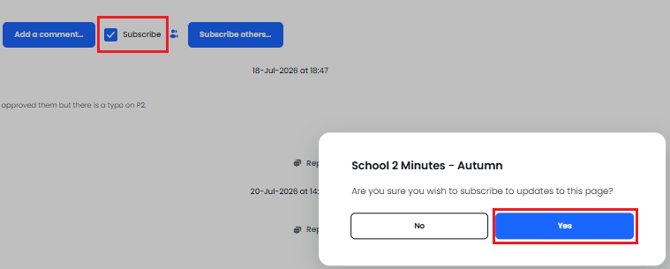
When you are 'subscribed' to that 'page' you will receive an email whenever a new comment is added or if the item is changed via an 'edit'. The email format is as shown below:

If you do not wish to remain 'subscribed' to a page then follow the above procedure and 'uncheck' the subscribe box and respond to the 'pop up' - you will then no longer receive the automated updates when comments are added.
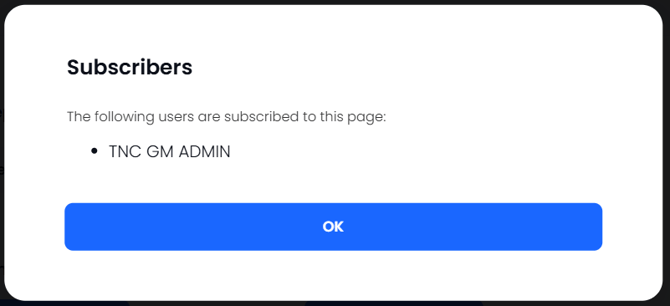
If you want to see who else has subscribed (so they are getting updates) click on the "people" icon and a 'pop up' will appear with the list of subscribers to this document:

The pop-up:
Note: When any user adds 'content' to Governance Manager (e.g. a file or meeting) they are automatically subscribed to that item as the 'owner' so they will see any responses - if that is not required then use the 'unsubscribe' process as described above (it is initially on as usually the 'document owner' will want to see comments and approvals).