The AI Enhance button is an AI-powered text enhancement tool that helps improve your written content. It provides intelligent suggestions to enhance text quality and clarity.
The AI Enhance button  is available within Professional Development and Compliance Management:
- Task List
- Internal CPD creation
- Impact Review user responses
- Course Reviews post completion
Whenever you see the AI Enhance button you can use it by following the steps below:
Step 1. Add text
-
Enter text into the supported text field:

Step 2. Click to Enhance
-
Click on the “AI Enhance” button. The text is enhanced based on what is inputted

After processing is complete, AI options are revealed:

Step 3. Select menu item
-
If Undo is selected, the AI menu closes, and the text reverts to the previous version.
- If Edit is selected, the content is accepted. The AI menu closes, and the user can edit the enhanced text manually.
-
If Refine is selected, three additional enhancement options appear:
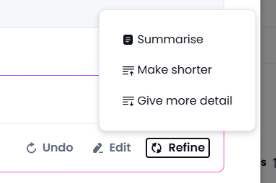
- If an additional enhancement option is selected, processing continues as in Step 2.